Pull planning and takt planning, on the same schedule.
Plan backward from a milestone with the people who do the work, move the trades through the building on one rhythm, and keep it all tied to the master schedule. Nothing to retype, no second tool.
Free for 14 days. No card needed. Then $12 a person a month, every feature included.
Trades and consultants join as guests, on just the projects they work on.
Sound familiar?
The sticky notes come down
The wall looks great after the session. By Friday someone is typing it into a spreadsheet, and the master schedule never hears about it.
Promises slip quietly
Work misses its date and nobody knows why until the next meeting, so the same problem comes back week after week.
Takt lives in a spreadsheet
The takt plan is a colour-coded grid only one person can update, and it drifts from the schedule the day it's made.
How 7SecondOS runs it
Pull plan
A Timeline with a lane for each trade or team, on the same tasks as the Gantt.
- Plan backward from a milestone, dragging work into each lane
- Every task has a Responsible person and a date: a promise
- A Look-ahead filter for the next 2, 3 or 6 weeks; late work that's still open always shows
- Trades join as guests and see only the projects they're on
Takt plan
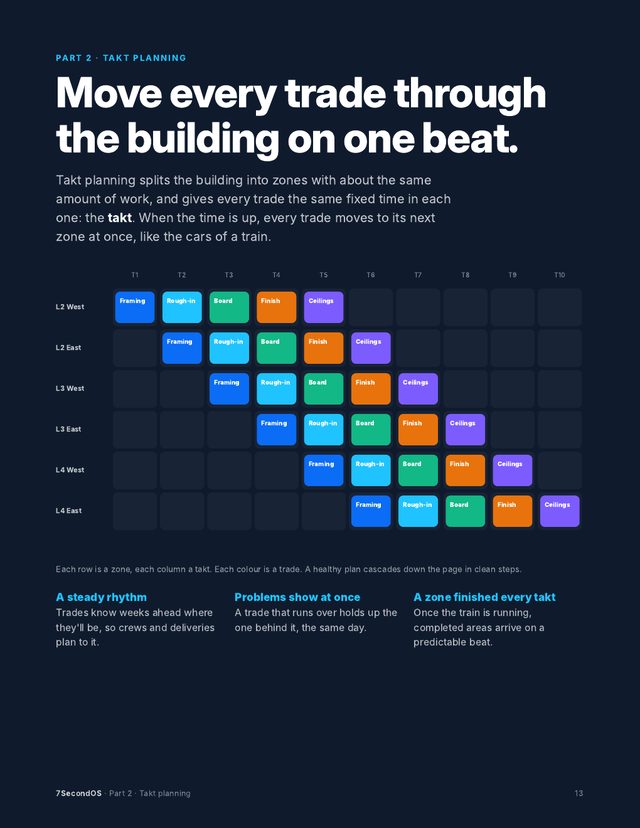
Zones down the side, one column per takt, and every trade moving through the building like a train.
- Build a train in one step: the trades in order, the zones, and a buffer for what goes wrong
- A balance chart shows the trade that won't fit the takt before you build
- Drag a card by whole takts, and whatever waits on it moves too
- Outline zones on a floor plan in the Canvas and watch the trades move, takt by takt
Pull Plan Coach
An AI teammate that checks the plan every week, so nothing slips quietly.
- Last week's promises kept, as a number and a percent, with the trend
- Asks the Responsible person of each missed promise what got in the way
- The reasons add up to Why promises slip: fix the cause, not the people
- Log a blocker in one click, linked to the task, so it shows until it's closed
One schedule
The pull plan and takt plan are views of the master schedule, not copies of it.
- A change in one view shows in the Gantt, List, Board and Calendar at once
- Links, lag, float and the critical path on the Gantt
- Excel and PDF for anyone outside the project
See it in 60 seconds
The screens in this video are illustrations with sample project data.
Free with your trial
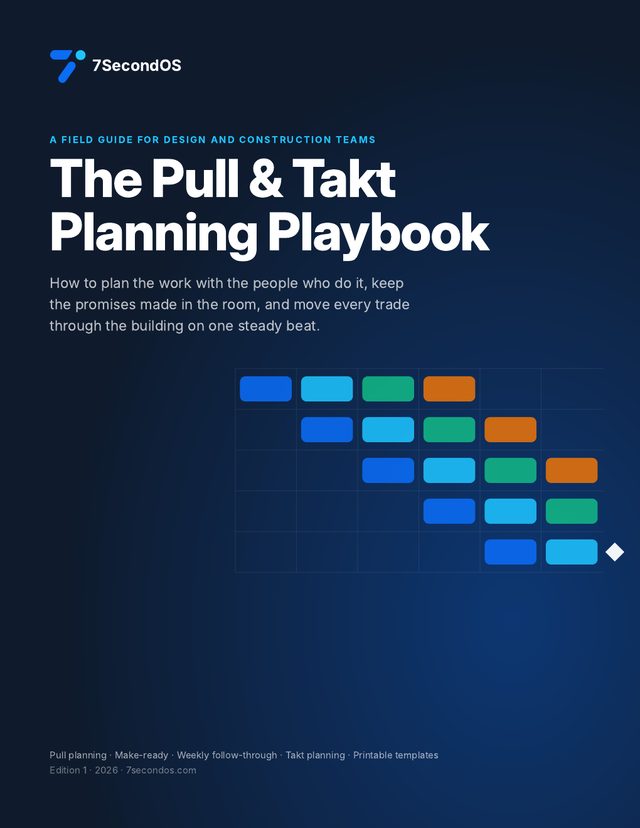
The Pull & Takt Planning Playbook
A 26-page field guide for design and construction teams, with diagrams on every page and five printable templates. Use it with sticky notes or with 7SecondOS.
- Push vs pull, and why pulled plans get kept
- Before the session: who to invite and what to bring
- Writing a good handoff note
- Running the session, minute by minute
- Make-ready: the eight things work waits on
- The 30-minute weekly rhythm
- Measuring promises kept, and the reasons behind misses
- Facilitating the hard moments
- Takt: zones, the takt, balancing and running the train
- Trackers and the RAIDD Log: linking every risk and decision to the tasks it holds up
- How AI helps at each step, and prompts to try
- Five printable templates
Already have an account? Sign in on the next screen and the download is waiting.
Pull planning, step by step
Pick one milestone, and define done
A DD set, a permit submission, dry-in. Write the conditions that must be true for it to count as done, and read them out at the start.
Invite the people who do the work
The lead of each team or trade, the owner's decision-maker, and a facilitator who doesn't own the work. Eight to fifteen people.
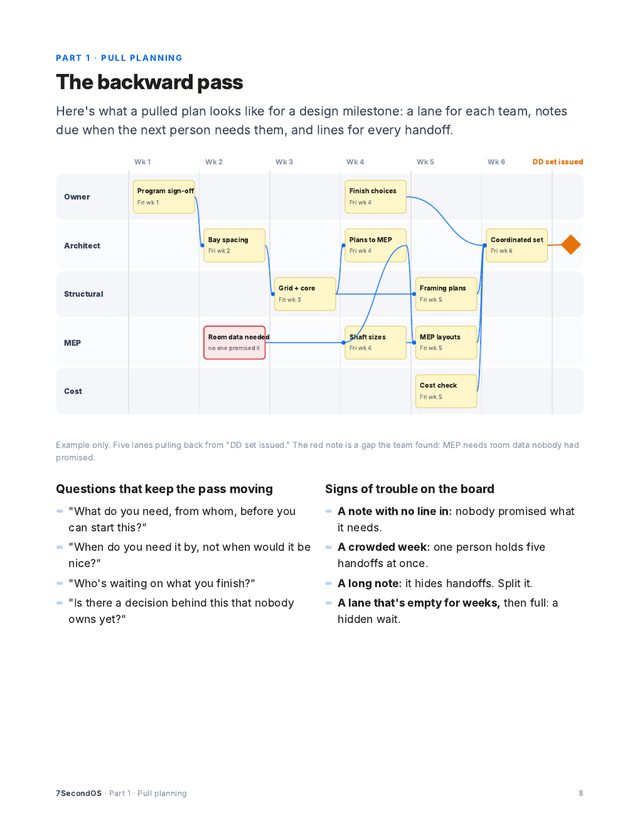
Pull backward, one handoff at a time
Start at the milestone: what has to be finished, and handed to whom? Each answer is a note in the giver's lane, due when the receiver needs it.
Find the gaps, then make it fit
Walk the plan forward from today. Where is someone waiting on something nobody promised? If it misses, change the plan, not the durations.
Make work ready, every week
Look three to six weeks ahead. Information, decisions, prior work, people, materials, equipment, space, approvals: anything missing gets an owner and a date.
Keep score, and learn from misses
Count the promises kept each week, and record one reason for each miss. The biggest reason is what to fix, not the people.
Takt planning in five moves
Gather the data
Trades in order, quantities per area, and each foreman's crew and days.
Set the zones
Areas with about the same work, not the same size, split where the crews can see the line.
Pick the takt
Often a week. Start from the slowest trade after balancing it.
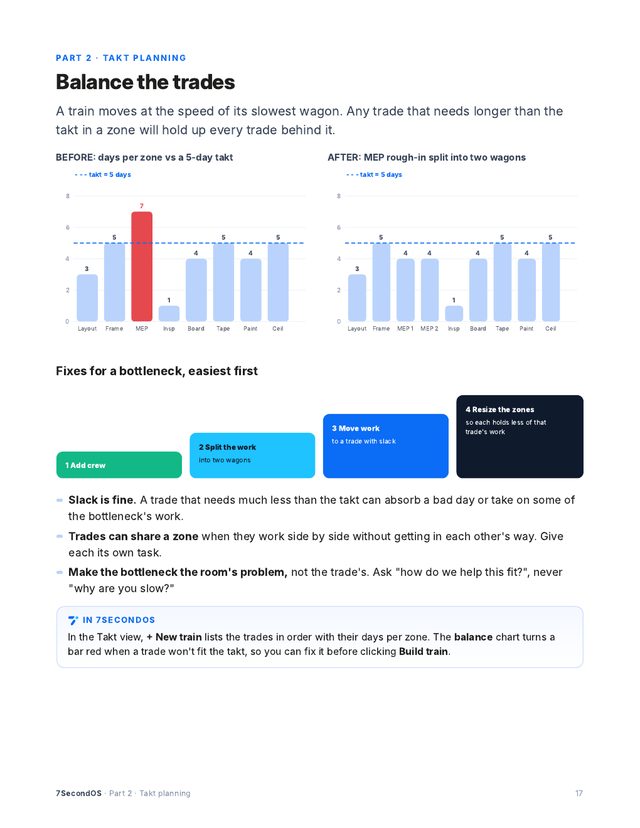
Balance the trades
Add crew, split the work, move work or resize zones until every trade fits.
Run the train
A short huddle every takt. Fix off-beat work the same day; spend the buffer last.
The playbook goes deeper on each step, with worked examples. Get it with your trial.
Read the playbooks online
Short versions of each chapter, with where each step happens in 7SecondOS. No sign-up needed.
Everything in Learn- What pull planning is, and why it worksPlan backward from a milestone with the people who do the work.
- Prepare for a pull planning sessionPick the milestone, invite the right people, and set up the Timeline before anyone arrives.
- Run the sessionWork backward from the milestone, one handoff at a time, until the plan holds.
- Keep the promises: weekly follow-throughA short weekly check that turns the pull plan into work that actually gets done.
- Facilitator tipsKeep the room honest, moving and focused on handoffs.
- What takt planning is, and when to use itEvery trade gets the same time in each zone and moves on together, like the cars of a train.
- Gather the dataQuantities, crew sizes and how long each trade really needs, before anyone draws a zone.
- Set the zones and the taktCut the building into areas of about equal work, and pick how long each trade stays in one.
- Sequence and balance the tradesPut the trades in order, then even out the one that can't keep up.
- Run it week to weekShort huddles, promises kept by takt, and fixing off-beat work before it spreads.
- Facilitator tips for taktGetting trades to commit to a beat, and keeping the room honest.
Questions
What's in the playbook, and what does it cost?
26 pages on running pull planning and takt, with diagrams and five printable templates. It comes free with the 14-day trial; no card is needed to start.
Do we have to use takt to pull plan?
No. Pull planning works on any project. Zones and takt are optional, switched on per project when you want them.
Do the trades need to pay?
Guests who only view are free. A guest you let edit, for example to update their own work, counts as a seat.
Can we start from the schedule we already have?
Yes. Upload your schedule as an Excel file and the AI drafts the phases, tasks and dates for you to check. Nothing is added until you approve it.
Try it on one real project
Run your next pull planning session in 7SecondOS and let the coach follow up the week after. Free for 14 days, no card needed.
Start your trialSee pricing, how 7SecondOS compares with other tools, or the guides and playbooks.